
How Scavland Inventory Works
The pack is a budget. The stash is how you stop paying the death tax.
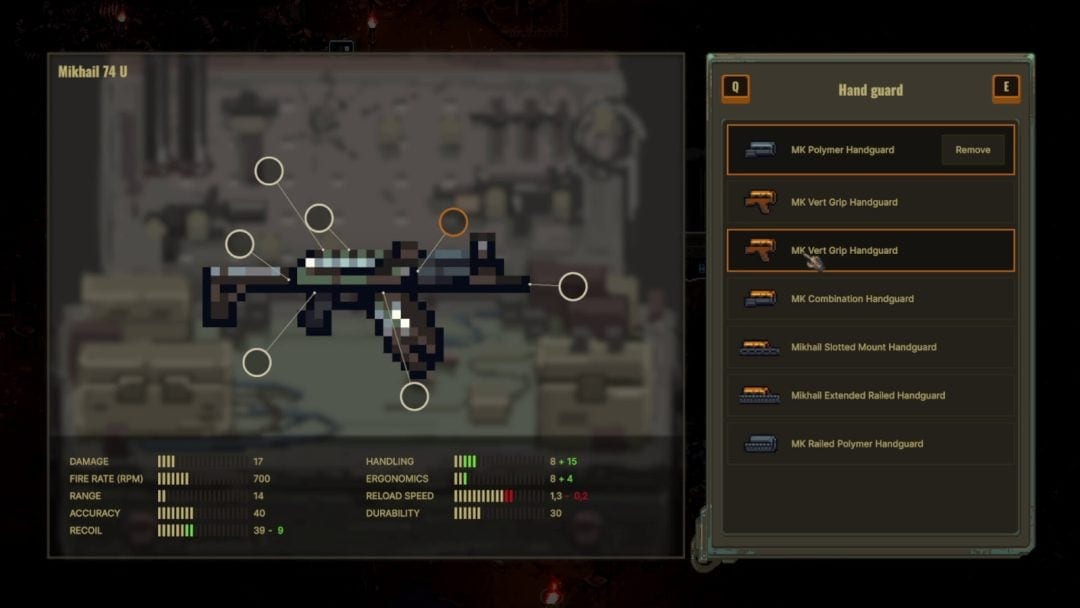
Scavland rebuilt its interface almost from scratch before Early Access. Steam community copy lists inventory, looting, trading, crafting, weapon customisation, HUD, interactions, Journal, and map as redesigned systems. This page is the pack. Crafting is the workbench. Attachments is what you bolt on once the gun still fits. If you skip this, a hatch will skip you.
Public footage and development recaps agree on a few verbs that matter more than a loot table: dump the backpack, rummage, stash, sort, assign a hotbar, and never install a part that makes the rifle larger than the hole you have left.
The backpack is a floor puzzle
Creators in keyboard videos drop the pack on the ground and sort in the dirt. That is not a meme. Early bags fill with mutant parts, cloth, and “valuable” scrap that is actually vendor weight. Getting Started already told you to sell red rags. This page tells you what the window can do:
- Equip / Unequip
- Inspect
- Repair
- Drop
- Remove attachments on weapons
Those redundant buttons exist so a Steam Deck pad is not hunting a one-pixel context menu. Use them. Inspect before you eat. Repair with the least advanced compatible kit so an Expert tin does not vanish on a Scrap pistol. Repair classes on guns are Scrap / Basic / Advanced / Expert. Worn gear uses Tattered / Scavenger / Medium / Heavy.
If the pack is full, the game will now tell you Not enough inventory space instead of deleting a weapon when a magazine changes its size. Older builds were less polite. Clear space first. Always.
Stash is the real backpack
Development notes describe a proper Player Stash loot window with Sort and Advanced Sort. Park rare parts, extra calibres, and quest objects in town before a bunker. A hatch is not a warehouse. If you wipe underground, the stash is what is still a person.
Quest items save as their own problem. Do not vendor a Mudlark warning, a dogtag run, or a named vial because a farmer waved coin. Jobs will not forgive that click. Main-quest objects belong in the stash or in the journal’s memory, not in the “sell all junk” reflex.
Sort when you are safe. Advanced Sort is for the evening in town, not for a corridor with a hellhound. The Life system does not pause because you opened a grid.
Hotbar, radial menu, and not dying in the menu
A toolbar helper lets you assign consumables to a hotbar. A radial menu then fires those items and swaps primary / secondary without opening the cathedral of sprites. That is how you drink, bandage, and change guns when the pack is a coffin.
Practical hotbar:
- Medkit or bandage
- Food or water, whichever your timer is losing
- Radiation meds if you insist on swamps — survival would rather you walked around
- A cleaning kit only if you already jam more than you bleed
Do not hotbar a quest object. Do not hotbar the only magazine that fits the rifle. Combat is won before the firefight by what you can press without thinking.
What to keep, what to fence
Public streams are useful as a packing list, not as prices. You will see canned food, gun cleaning kits that cost like guns, bandages, ammo casings, anti-poison, screws, and creature bits (rat teeth, acid glands, dog skin). Some of that is crafting input. Some of it is a farmer’s lunch. Until a patch names the recipe book:
- Keep kits, meds, matching ammo, and extra magazines that fit the primary.
- Keep quest objects. Retrieval jobs place items dynamically; distance is pay; selling them is a joke.
- Keep one sight and one muzzle you understand. Strip the rest into the stash. Attachments that grow the sprite fail the pack test.
- Sell duplicate broken pistols, decorative cloth, and the third melee toy.
- Park named bodies you are not feeding (a Medved you cannot ammo, a Nagant you will not shoulder) in the stash, not on your spine.
Canteens have had distinct sprites for old versus new in recaps. Water is a timer with a radiation rider. Two bottles that look similar can be different items. Inspect.
Loot distance, corpses, and greed
Container outlines became visible from farther away in a 0.2.x changelog, while loot distance itself stayed the same. You can see a crate before you can take it. That is a stealth gift and a bait. Corpses save their state across loads in later notes. If you dropped a pack to fight, remember where the dirt is.
Weight is the silent enemy. A Vulture who loots every screw will jog into the Mist and lose the medkit that mattered. The starting loadout is the day-one version of this sentence. The beginner checklist is the tick boxes. This page is why the boxes exist.
After 4 September 2026
Hundreds of items were already in the pre-launch recaps. Early Access will add more. We will not publish a fake item ID dump. When Steam news names a stash change, this guide moves. Until then: dump the pack, stash the future, hotbar the bleed, and leave empty space for the gun you still have to carry home.
The wasteland is relentless. The grid is how you decline that invitation.
Frequently Asked Questions
Quick answers to the most common questions.
Can I drop my backpack in Scavland?
Yes. Public PC footage shows Vultures dumping the pack on the ground to sort. Do it in town or behind cover, not in a hatch doorway.
What is the player stash?
A town storage window with Sort and Advanced Sort in development recaps. Park extra guns and quest items there before a bunker. See bunkers.
Why did a weapon vanish when I attached a part?
A part that changes inventory size needs free pack space. Clear room or the game warns you. Details on attachments.
What should I put on the hotbar?
A heal, a food or water, and maybe radiation meds. Use the radial menu in a fight. Keep quest items out of the hotbar.